Objective functions
TOPDyn has the following objective functions:
Input power
Compliance
Elastic Potential Energy
Kinetic Energy
Strain-to-kinetic energy ratio
Local strain-to-kinetic energy ratio
Local elastic potential energy
Local kinetic energy
To use an objective function is necessary to pass to the argument func_name the name of the function as a string. In the code, objective functions are called as:
Input power -> ‘input_power’
Compliance -> ‘compliance’
Elastic Potential Energy -> ‘elastic_potential_energy’
Kinetic Energy -> ‘kinetic_energy’
Strain-to-kinetic energy ratio -> ‘r_ratio’
Local strain-to-kinetic energy ratio -> ‘local_r’
Local elastic potential energy -> ‘local_ep’
Local kinetic energy -> ‘local_ki’
Also, can be defined the frequency that pretends to be optimized, argument freq1, and the weight applied (parameter n1) to the objective function. If the weight n1 applied is negative, then the function is maximized. The code below shows how is the definition of these parameters in Python language.
func_name = 'input_power'
freq1 = 50
n1 = 1
In order to be able to optimize two objective functions, they must be combined to minimize both. Thus, the following multi-objective function is proposed:
where F1 is the function passed in the parameter func_name, and F2 is the function passed in the parameter multiobjective, and n1 is the weight that controls the priority between the functions. The parameter multiobjetive is a tuple with the name of the function and the frequency associated with this function. In the code example below, the value of n1 is 0.99, so the input power function will have a higher priority than the compliance function.
multiobjective = ('compliance', 0)
func_name = 'input_power'
freq1 = 50
n1 = 0.99
Passive elements
Region in which you don’t want to change the shape. This region of passive elements is defined in parameter passive_coord as:
((initial x-axis coordinate, final x-axis coordinate), (initial y-axis coordinate, final y-axis coordinate))
In the Figure 2 is created a mesh with:
nelx, nely = 50, 100
lx, ly = 0.5, 1
passive_coord = ((0, 0.5), (0.95, 1))
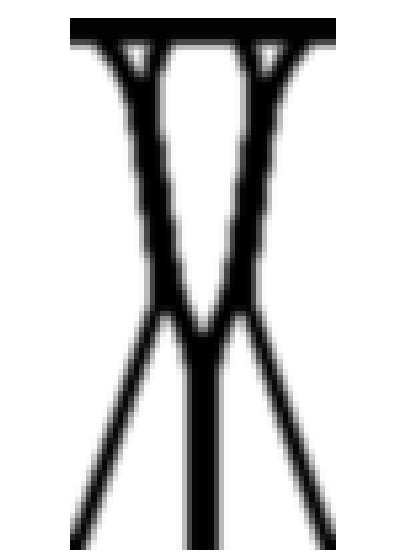
Figure 2: Load applied at all nodes with Y = 0.1.
IGES file
The IGES file takes precedence over the number of elements and the size of the elements, that is,
If parameter mesh_file is different from None, the coordinates from the IGES file will be considered.
If parameter mesh_file is None, the coordinates from parameters nelx, nely, lx and ly will be considered.
In the 3D mesh, the number of elements that the mesh must have in each direction is also defined.